Skip to content
TL;DR
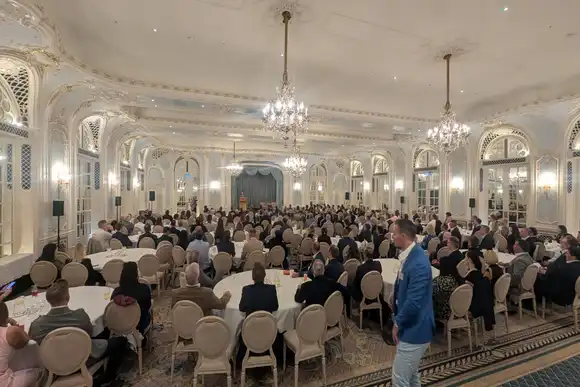
A professional AGM livestream requires more than placing a camera at the back of the room. The production must give remote shareholders clear sound, readable presentations, secure access, and a practical way to ask questions. EMS Events can manage the cameras, audio, graphics, streaming platform, rehearsals, technical crew and backup systems through one coordinated production plan.
To livestream an AGM professionally, use a secure streaming platform, broadcast-quality cameras, presentation feeds, dedicated microphones, and a reliable internet connection. EMS Events can manage the complete production, including planning, filming, branded graphics, platform delivery, rehearsals, remote participation, technical monitoring, and a backup recording.
An AGM livestream must support the meeting’s formal purpose while providing remote shareholders with a clear and reliable viewing experience.
Poor audio, unreadable slides, or delayed switching can make it difficult to follow important company information. Access problems may also prevent shareholders from joining on time.
A professionally managed AGM webcasting and live-streaming setup brings the cameras, presentation content, microphones, streaming platform and technical team into one production plan.
Start with the AGM format and shareholder requirements
The livestream plan should begin with the meeting format, audience and governance requirements. The production team needs to understand who may watch, who can participate, how questions will be handled and whether voting takes place through a separate system.
Confirm the following before selecting equipment:
- Will the AGM be fully virtual or hybrid?
- Is the stream public or restricted to shareholders?
- How will viewers confirm their identity?
- Can remote shareholders submit questions?
- Will voting take place during the meeting?
- Does the company need a recording?
- Are captions or interpretation required?
- Which presentation materials will appear on screen?
The company secretary or legal adviser should confirm the formal meeting, voting, quorum, and shareholder-access requirements. The AV team can then build the technical workflow around those decisions.
EMS Events provides comprehensive annual general meeting event production, allowing in-room presentations and online broadcasts to be planned together.
Choose a secure streaming platform
An AGM platform should match the level of access control, interaction and reporting required. A public stream may suit an open corporate update, while shareholder-only proceedings normally need registration, authentication or password protection.
The chosen platform should support:
- Controlled viewer access
- Stable video delivery
- Branded holding screens
- Live and moderated questions
- Presentation sharing
- Viewer analytics
- Recording
- Technical administration
Platform selection should happen early. Registration data, shareholder communications and joining instructions may need to be prepared well before the event.
EMS Events can provide a password-protected stream where access needs to remain restricted. The production can also include custom layouts, company branding and live audience Q&A.
Make broadcast audio the first technical priority
Clear audio matters more than an elaborate camera setup. Remote shareholders must hear the chair, directors, presenters and questions without changes in volume, background noise or echo.
Each main speaker should have a dedicated microphone. Lapel microphones suit seated directors and presenters, while lectern microphones work for formal addresses. Handheld microphones can capture questions from people attending the room.
The streaming audio feed should come directly from the sound system, not from a camera microphone. This gives the online audience a cleaner signal and allows the technician to manage each speaker separately.
Remote contributors also need testing. Their microphone, internet connection, lighting and background should be checked before they join the live proceedings.
Use multiple cameras with planned shot positions
A single wide camera can document an AGM, but it rarely creates an engaging or informative broadcast. Multiple cameras allow the online audience to see the active speaker, the board, the lectern and the wider room when required.
A practical AGM setup may include:
- A wide shot of the stage or board
- A close shot of the chair
- A separate presenter angle
- A camera for audience questions
- A direct presentation feed
The vision mixer selects the most relevant view during the meeting. Transitions should follow the agenda so the broadcast moves naturally between speakers, slides, questions and voting instructions.
Camera positions must also protect the in-room experience. Tripods, operators and cables should not block exits, sightlines or shareholder movement.
Send presentations directly into the webcast
Presentation slides should enter the livestream as a direct digital feed. Filming the venue screen with a camera makes text harder to read and can introduce glare, flicker or distorted colours.
The broadcast team can combine slides with camera views in several ways. A full-screen slide works for detailed financial information. A split-screen layout keeps the speaker visible alongside the presentation. Branded frames can also display the company logo, speaker name or agenda section.
All presentation files should be collected before the rehearsal. Check videos, fonts, animations and embedded audio on the production system rather than assuming they will behave as expected.
A planned hybrid and virtual event production workflow treats remote viewers as a separate audience instead of showing them a basic copy of the room.
Our guide to how hybrid events have evolved explains why both audiences must be considered from the start.
Plan shareholder questions and remote speakers
Remote participation requires a managed process. Without moderation, repeated questions, silent microphones and unexpected interruptions can slow the formal meeting.
Decide whether shareholders will submit questions in advance, type them during the stream or speak live. A moderator should review incoming questions, group similar points and pass approved questions to the chair.
Remote speakers should join a separate technical check before entering the live broadcast. The production team can confirm their name, role, connection, camera position and microphone level.
The chair should also know how remote questions will be introduced. This keeps the online contribution connected to the meeting rather than treating it as a separate conversation.
Rehearse the complete AGM, not only the equipment
A technical test confirms that the equipment works. A full rehearsal confirms that the production works with the agenda, speakers and shareholder process.
The rehearsal should cover:
- Opening holding screen and countdown
- Chair’s introduction
- Speaker and camera changes
- Presentation playback
- Remote contributor entry
- Shareholder questions
- Voting instructions
- Closing statement
- Stream ending and recording
Use the actual presentation files, laptops, microphones and remote connections where possible.
The hybrid-production process should also define who makes each decision during the event. A clear show-call structure prevents several people from giving conflicting instructions. The EMS Events guide to planning and producing hybrid events provides further context on connecting venue production with the online delivery.
Build technical backup into the plan
A professional AGM stream needs backup routes for the elements most likely to interrupt the meeting. Redundancy should be proportionate to the importance and complexity of the broadcast.
The production plan may include:
- A secondary internet connection
- Backup microphones
- Spare presentation adapters
- A duplicate copy of the slides
- Backup playback equipment
- Local camera recording
- A holding message for temporary interruptions
- Contact details for remote speakers
- A recovery process for the streaming platform
Recording the meeting locally is particularly useful. Even when the live stream is recorded by the platform, a separate production recording provides an additional copy for the company archive or later publication.
If the recording needs editing before it is shared with shareholders, EMS Events also provides event filming and video production.
Why use EMS Events for AGM live streaming?
EMS Events can manage the online broadcast and the production taking place on-site. This provides one technical plan for cameras, sound, presentations, streaming, graphics and remote participation.
The service can include:
- Streaming platform planning
- Multi-camera filming
- Presentation integration
- Microphones and sound systems
- Branded broadcast layouts
- Shareholder Q&A support
- Remote speaker management
- Rehearsals
- On-site technical crews
- Recording and post-event video
- Backup equipment and monitoring
One production team can also communicate directly with the venue about loading, internet access, equipment positions and setup times. This reduces the risk of the room and livestream being planned as separate projects.
Plan your AGM livestream with EMS Events
A professional AGM livestream should give remote shareholders the same clarity and confidence as those attending in person. That requires secure access, clean audio, readable presentations, managed participation and tested backup systems.
Contact EMS Events to discuss live streaming, filming and complete technical production for your next AGM.
FAQs
What equipment is needed to livestream an AGM?
A professional AGM livestream normally needs broadcast cameras, microphones, a sound mixer, presentation capture, video switching, streaming encoders, and a stable internet connection. The exact setup depends on the venue, number of speakers, remote participation and whether shareholders need secure access or live Q&A.
Can an AGM livestream be password-protected?
Yes. An AGM webcast can be placed behind registration, password protection or another controlled-access process. The right option depends on who may attend and how the company verifies viewers. Access arrangements should be agreed with the company secretary before shareholder invitations are issued.
How many cameras does an AGM livestream need?
A simple AGM may use two cameras, while a larger production may need separate views for the chair, board, presenters and audience questions. Camera numbers should follow the agenda and room layout rather than a fixed formula.
Should an AGM be recorded and livestreamed?
Recording provides a useful company archive and a backup if viewers experience local connection problems. The organisation should confirm how the recording will be stored, who may access it and whether edited or captioned versions will be published later.
How early should an AGM livestream be planned?
Planning should begin once the date, venue and meeting format are confirmed. Earlier preparation is valuable when the event requires restricted access, shareholder registration, remote voting, several speakers, captions, interpretation or a custom streaming platform.